Last week I wrote the initial code for an AI agent: a simple loop that could prompt an LLM with a query, with support for basic in-context memory and tool calling.
Missing from this loop was the ability for the agent to reason and act in multiple steps. So this week I implemented (with Claude’s assistance, I won’t lie) a basic ReAct loop to improve the agent’s problem-solving capability.
Let’s dive into the details below.
As usual, the code can be found on GitHub, at: github.com/EvanKuhn/agents.
Previous State
As mentioned, the state of the agent loop from last week only allowed for one reasoning step, followed by a single tool call. This could only solve basic queries. To be able to respond to more complex queries, the agent needed the ability to think, act, observe, and repeat multiple times.
For example, consider the prompt “Find the .py file containing Theme definitions”. The agent first
needs to call the list_files tool to list files in the current directory, and then call either
list_files or read_file to recursively search for the target file. With only a single think/act
opportunity, this is not possible.
The ReAct Loop
The ReAct loop (short for Reasoning + Acting) is a foundational design pattern that transforms a simple AI chatbot into an autonomous AI agent. The ReAct loop was introduced in 2022 by Yao et al. via their research paper, ReAct: Synergizing Reasoning and Acting in Language Models.
In this paper, they describe how models had, until then, displayed prowess either with pure reasoning, via Chain-of-Thought prompting, or with action plan generation. However, these two capabilities had not been combined, so the authors investigated the effect on model effectiveness by interleaving these behaviors.
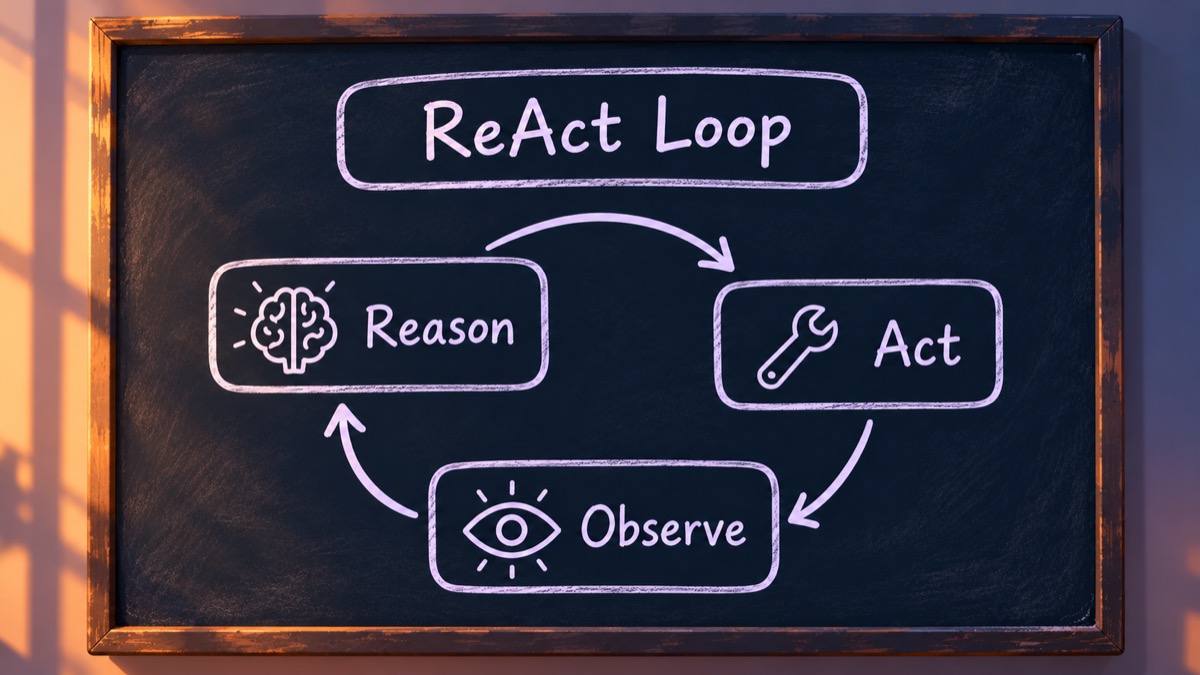
In particular, the authors prompted the model to perform the following loop:
- Thought: The model writes a text-based reasoning trace about its current state and plans what it needs to find out next.
- Action: The model executes a specific tool call, such as querying a search engine, interacting with an API, or checking a database.
- Observation: The external environment returns a real-world result (e.g., search snippet or API error). The model reads this result and uses it to inform its next thought.
The model then repeats this loop until it can produce a final, factually grounded answer.
The ReAct loop was found to drastically reduce instances of hallucination over strict Chain-of-Thought reasoning. It also provides a clean paper trail of thought => action sequences, and allows the agent to better handle tool errors and change its approach.
These benefits, however, come with a few costs. Multiple reasoning steps require additional LLM calls, which increases cost and latency. Additionally, agents can become stuck in an infinite loop of reasoning and tool calls.
How it Works
Changes to the core loop are straightforward: rather than supporting a single LLM query and a single tool call, allow for multiple reason-act iterations per user prompt. In Pythonic pseudocode, this change can be distilled down to adding a loop around the model and tool calls:
def handle_user_prompt(user_prompt, messages)
    for i in range(MAX_ITERATIONS):  # <=== added
        # Call LLM
        reply = query_model(user_prompt, messages)
        messages.append(reply.text)

        # Return if more tool calls
        if not reply.tool_calls:
            return reply.text

        # Execute tool calls
        for tool_call in reply.tool_calls:
            tool_result = run_tool(tool_call)
            messages.append(tool_result)

        # One final tool call
        return query_model(user_prompt, messages).text
One important piece of complexity to point out in the above pseudocode is management of the context,
which refers to saving the model responses and tool call results to a special messages array.
This array is fed back into the model with each call. It turned out the model’s thinking needs to
be saved there too, which I only discovered by accident (more on that below).
Additionally, we added a simple guardrail around the number of ReAct iterations. It should be obvious that the agent could potentially enter an infinite loop of reasoning and action, so we cap the maximum number of iterations at a small number (ten, in this case). For the small proof-of-concept agent we are building, that’s fine, though of course this limits the complexity of problems that the agent could solve.
A Subtle Bug: Forgotten Reasoning
With the loop in place, I asked a question: ReAct is supposed to be think, act, observe, then think again. Is the model really reasoning between its tool calls, or just planning them all up front?
The loop did allow reasoning between calls: every round is a separate request to the model, and it
thinks before deciding each next step. But the model’s thinking was being thrown away after every
round. Only the reply text and the tool calls were saved to messages. So in round 2, the model
could see what tools it had called in round 1, and what came back, but not why it had made
those calls.
Whether that matters depends on the model’s chat template, which I touch on below. qwen3’s template turns out to be designed for exactly this pattern: it puts the model’s earlier thinking back into the prompt, but only for messages since the user’s latest one. Within a single question’s tool loop, the model sees its own reasoning from earlier rounds. Thinking from earlier questions is dropped, so it doesn’t pile up in the context.
The fix was small: save each reply’s thinking along with its text and tool calls. It also shaped one design detail. When the agent hits its round limit, it adds a note telling the model to stop calling tools and answer. That note goes at the end of the last tool result rather than into a new user message, because a new user message would make qwen3’s template drop all the earlier thinking, right before the model’s final answer.
The lesson here is that an agent’s behavior depends on details below your own code. Nothing crashed, and the answers looked fine. But model was reasoning with less information than it should have had.
Testing and Results
I tested the agent with a few sample questions:
- Multiply the current hour by 5
- Tests usage of
get_current_timetool.
- Tests usage of
- How many days until Christmas?
- The model could use the
get_current_timeandcalculatetools, though it isn’t required.
- The model could use the
- What percentage of PLAN.md is done?
- Tests usage of the
read_filetool.
- Tests usage of the
- In which file are the CLI’s theme colors defined?
- Tests usage of
list_filesandread_filetools. Requires multiple iterations.
- Tests usage of
I tested with three models, all around 8 billion parameters and compressed (quantized) to 4 bits per weight, so they run comfortably on a laptop:
- llama3.1 (8B), from Meta
- qwen3 (8B), from Alibaba’s Qwen team
- deepseek-r1 (8B), DeepSeek’s R1 distilled into Qwen3-8B: the same base model as qwen3, trained to imitate DeepSeek’s much larger R1 model
However, only qwen3 provided useful results, and the reason comes down to each model’s chat template. A model doesn’t actually receive a list of messages. It reads one long string, formatted with special tokens that mark whose turn is whose, in the exact format the model was trained on. Ollama ships each model with a template that does this formatting, including how the available tools are described to the model:
- llama3.1’s template wraps the user’s latest message in an instruction to “respond with a
JSON for a function call”. So the model called a tool for everything, even
calculate('llama3.1')when asked which model it was. - deepseek-r1’s template never includes the tool definitions at all, so the model never sees them. It would claim to use tools and invent their results.
- qwen3’s template lists the tools in the system prompt and says the model may call them, so it used tools only when they were needed.
The deepseek-r1 result is the most striking: it shares qwen3’s base model, yet one used tools well and the other couldn’t use them at all. A model’s fine-tuning, and how its conversation is formatted, matter as much as the underlying model. All three models report that they support tools, but that label alone doesn’t tell you how well the model can actually use them.
Prompt: Multiply the current hour by 5
Using qwen3, the agent was able to answer this query fairly easily, with a single tool call to get the current datetime:
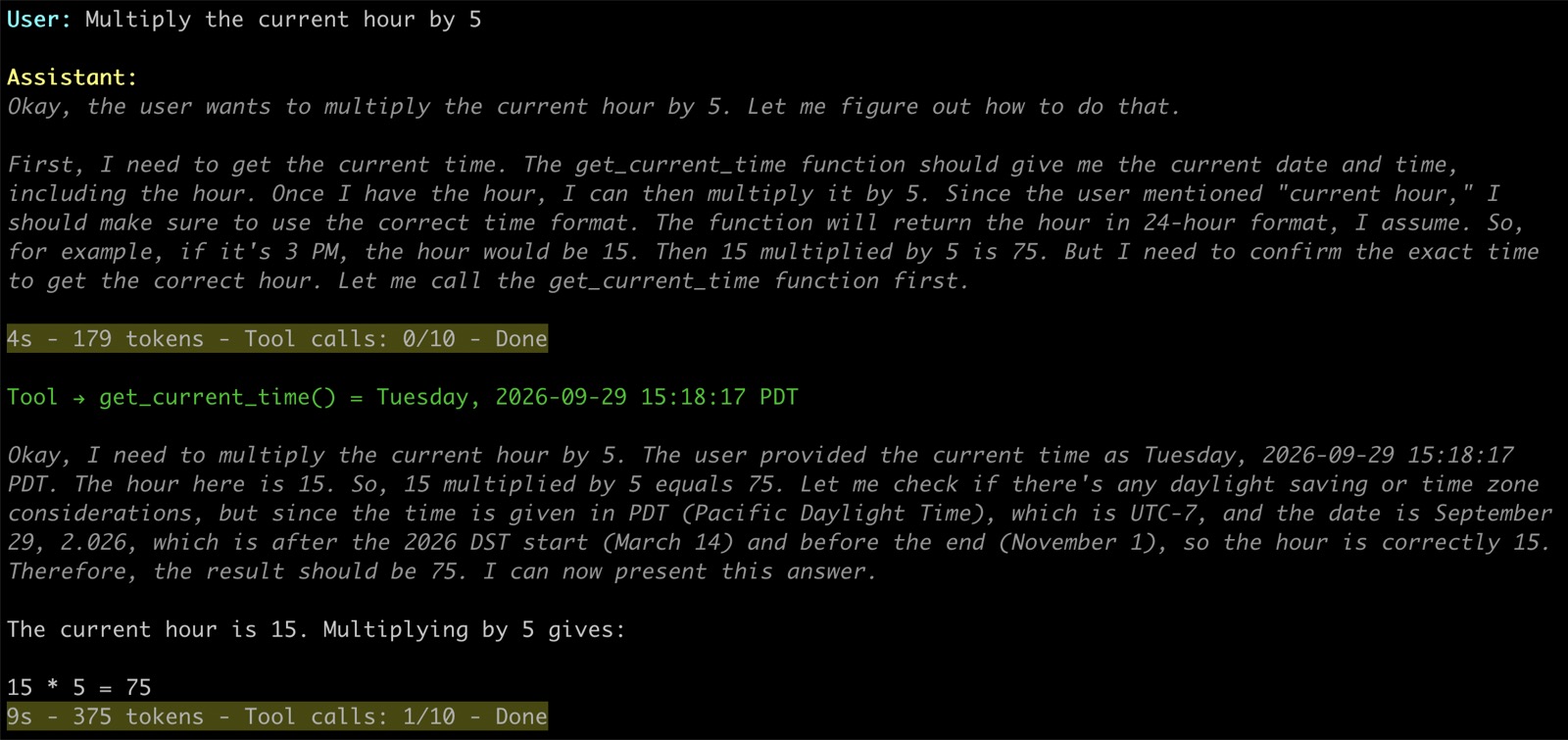
Notable is the fact that the model was able to perform simply multiplication via inference, rather
than using the calculate tool. Changing the prompt to multiply by a larger number (7391) caused
the model to use the tool. Instructing the model to use the calcuate tool also worked, but not
with 100% consistency.
This is an interesting finding: models can perform simple arithmetic via inference. While convenient, a tool call would be preferable, for accuracy.
Prompt: How many days until Christmas?
This call produced interesting results. The reasoning process was extremely long, with the model constantly questioning its assumptions and repeatedly listing the days in each remaining month. The model was able to add the days correctly again simply via inference, eventually arriving at the correct answer.
Prompt: What percentage of PLAN.md is done?
The model could successfully reason and execute a read_file tool call. Parsing the file and
doing the math to calculate the percentage took some significant reasoning, but no call to
calculate was needed to arrive at the correct result.
Just like in the “days until Christmas” prompt, the model was able to perform simple arithmetic
simply through inference. Again, I would have preferred it use the tool. Modifying the prompt
to tell it to use the calculate tool triggered this behavior successfully.
Prompt: In which file are the CLI’s theme colors defined?
The model initially failed this prompt, as it would list files in the current directory, but not search subdirectories.
Modifying the prompt to tell it to search subdirectories helped. The model iteratively searched
until it eventually read the src/agents/config.py file. It then correctly concluded that the
themes were defined in src/agents/ui.py, because config.py imports them from there. It got
there by deduction, though, not verification: it answered without reading ui.py to confirm.
A caveat: context size
All of these tests ran with a context window of only 4,096 tokens. That’s Ollama’s default when a
request doesn’t ask for more, even though these models support anywhere from 40,000 to 131,000.
A single round can use most of it: the system prompt, the tool definitions, hundreds of tokens of
thinking, and the contents of any file read. When the limit is exceeded, Ollama drops the
oldest part of the conversation, so on longer tool chains the model may have lost track of its own
earlier steps. It can be raised with Ollama’s num_ctx option, so these tests are worth rerunning
with a larger context.
Lessons Learned
The loop itself turned out to be the easy part: a dozen or so lines of code. The hard parts were everything around it:
- Model judgment. The loop gives the model room to work through a problem, but the model still decides what to do with it. qwen3 needed a hint to search subdirectories, and preferred mental arithmetic to the calculator.
- Chat templates. How each model’s conversation is formatted decided which models could use tools at all, and whether the model could see its own earlier reasoning.
- Context. Every round adds to the conversation. With a small context window, a model can quickly lose earlier reasoning.
What’s next
Next I’ll be adding procedural memory (eg: loading skills files), and then episodic memory, which will involve storing past conversations, and embedding them in a vector database for future semantic search and retrieval. That should be interesting!